Chart Of Accounts Window
Goldenseal includes a graphic Chart of Accounts, with icons for every account organized into 4 scrolling columns. The interface would be very difficult to update and it was not very useful, so it is not included in BizWrench.
Custom Layouts
To modify layouts in BizWrench, first open the tab for the type of record you want to change, then click the Layout button. Once you are in the Layout window you can change to other types of layouts.
Some advanced layout changes are not currently possible in BizWrench. Rather than write complex interface for them, We plan to export text files that you can modify, then import.
Extended ASCII
BizWrench uses UniCode for text. It handles millions of possible characters, emojis, etc.
When we wrote code for Goldenseal, ASCII was the standard way to store text. It uses 7 bits (128 items) for upper and lower-case letters, numbers, and a limited range of punctuation marks. Macintosh and Windows both expanded ASCII to 8 bits: enough to cover most European languages, plus fancier punctuation.
Extended ASCII characters won't survive the conversion to BizWrench (they also won't convert between Mac and Windows, which use different systems).
You may see mystery characters in text, instead of Greek letters, accent marks, tildes, umlauts or other non-ASCII marks. If there are just a few of them, select the bad text and enter a UniCode character.
If there are many bad characters in name/address/comment fields, follow these steps:
- Select the bad character.
- Choose Copy from the Edit menu (Command/Control-C).
- Open the account or transaction class that needs fixing.
- Click the Find button then click Find All.
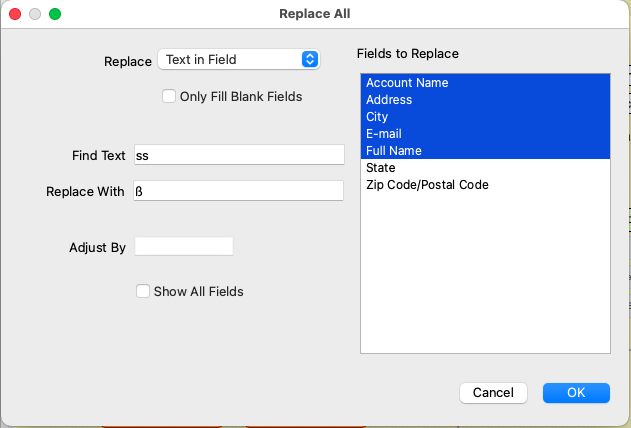
- Click the Records button, and choose Replace All.
- Enter Text in Field into the Replace popup field.
- Click in the Find Text field, and choose Paste from the Edit menu (Command/Control-V).
- Click in the Replace With field, and enter the UniCode character to use instead.
- Click in the Fields to Replace list and select the text fields that will get the replacement. Hold down the Shift key to select multiple items.
- Click OK. BizWrench will replace text in the selected fields.
- Repeat for any other accounts or transactions that have bad text.